In the app, free and unlimited Every plan
Every alert lands in the AppyShift app's inbox, with a push notification on the iPhone app.
AppyConnect by AppyShift
Every alert reaches your team in the AppyShift app, by email, and by text for the people who want it. With texts on, employees and managers answer with one word: CLAIM a shift, CALLOUT, APPROVE. Add messages, announcements people acknowledge, and a team board.
Included from the Growth plan up. See plans
At a glance
Every alert lands in the AppyShift app's inbox, with a push notification on the iPhone app.
Schedules, time off, swaps, onboarding and announcements by email too. No phone number needed.
Only for people who turn texts on and confirm their number with a code. Every plan includes texts each month.
Employees reply CLAIM to an open shift, OK to a new schedule or CONFIRM to a shift, or tap the link in the text.
Employees text SHIFTS for their next shifts, HOURS, BALANCE for time off left, OFF and a date to ask for time off, or LATE and CALLOUT with a reason.
Reply APPROVE or DENY to pickups, swaps and availability changes, text TODAY for today's team, or OPEN to offer open shifts.
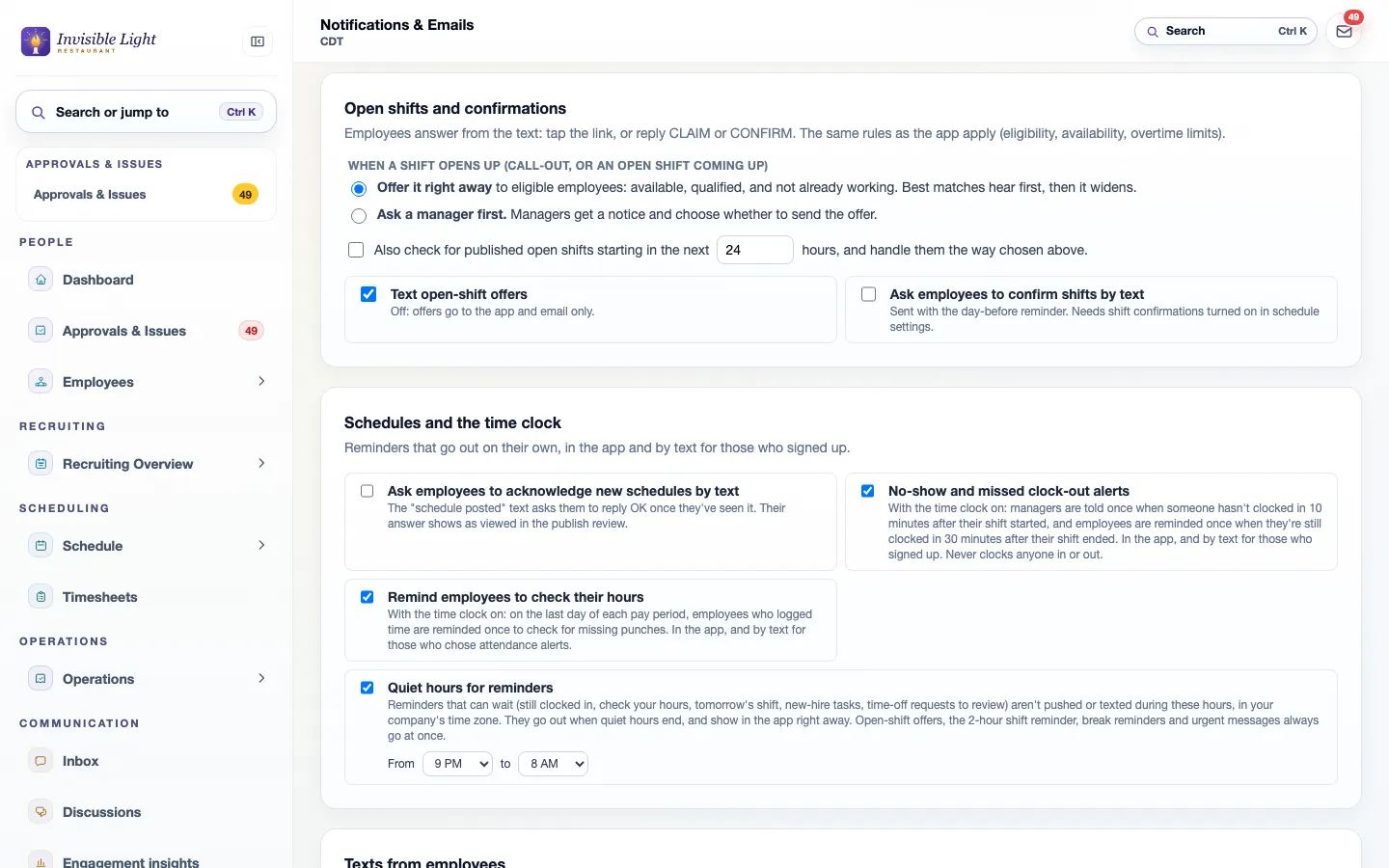
Reminder texts that can wait aren't sent overnight: 9 PM to 8 AM in your time zone unless you change it.
Reply STOP to any text to end them. Texts only ever go to people who opted in.
One-to-one threads that either side can start. Send the same message to several employees at once.
Post to everyone or one department, schedule it, add files, and see who has seen and acknowledged it.
Mark an announcement urgent and a company admin can send a short text to the employees who chose emergency alerts, twice a week at most.
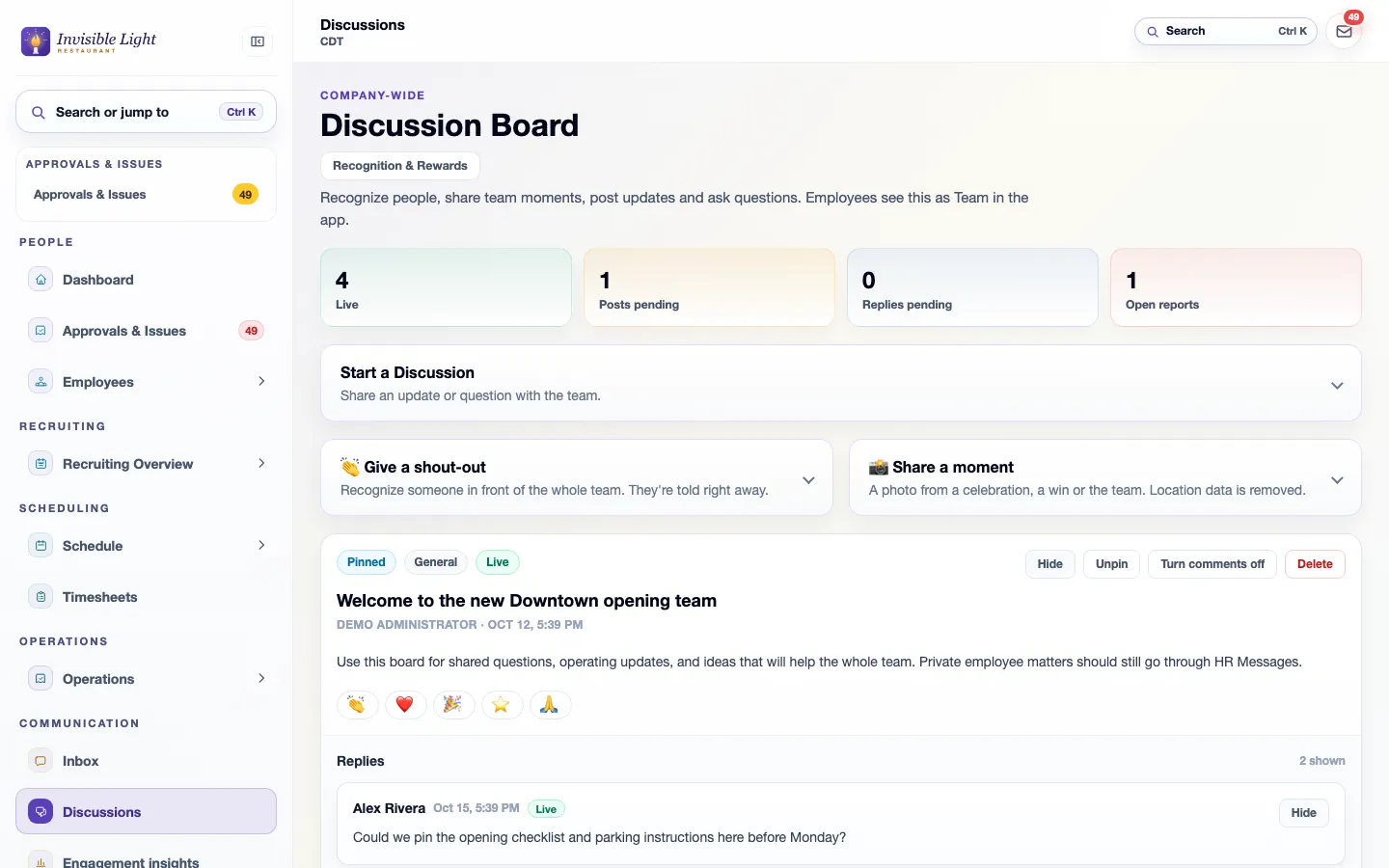
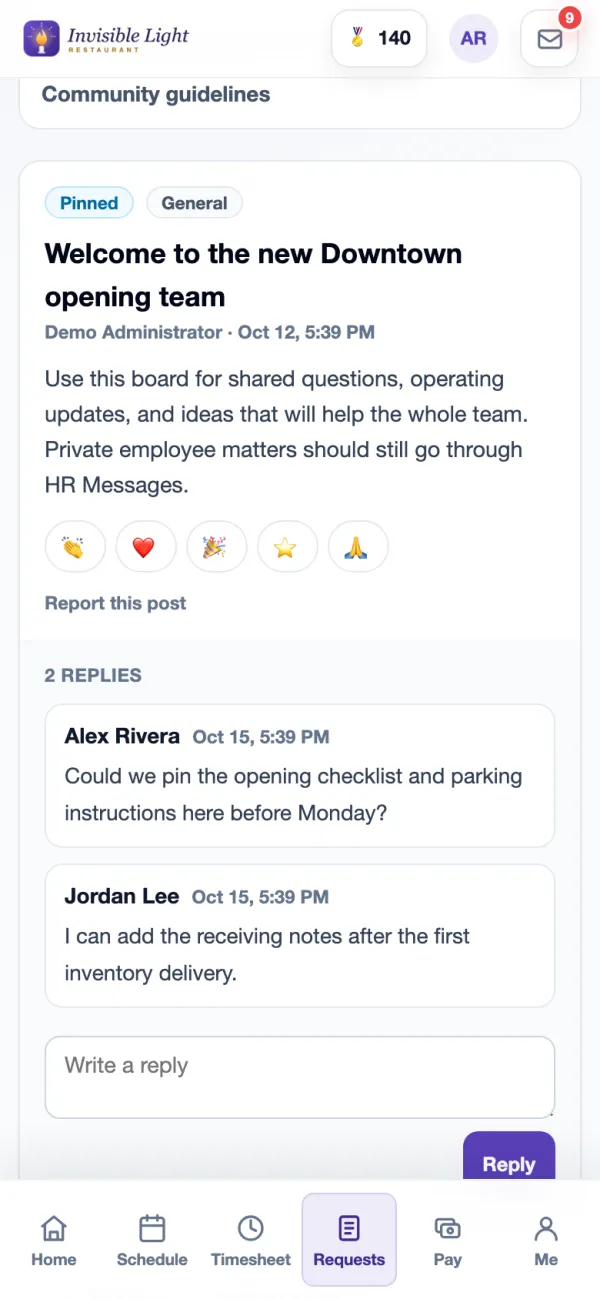
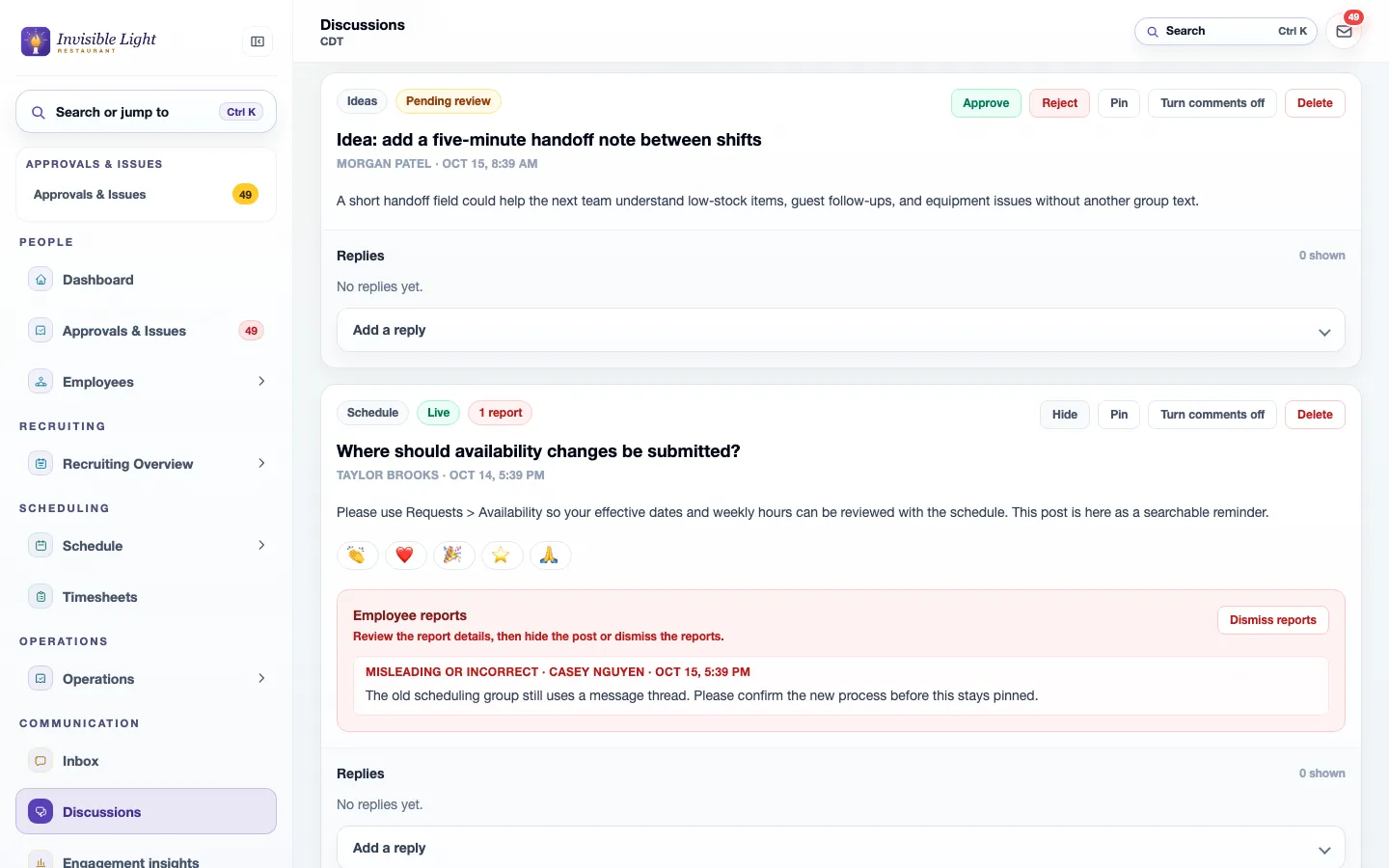
Posts, replies and reactions for the whole company, with pinned posts and manager approval before posts go up if you want it.
Ask chosen employees text, multiple choice, rating or yes-and-no questions, and see the answers.
Shift notes and manager-to-manager follow-up for the next shift.
See it in the app
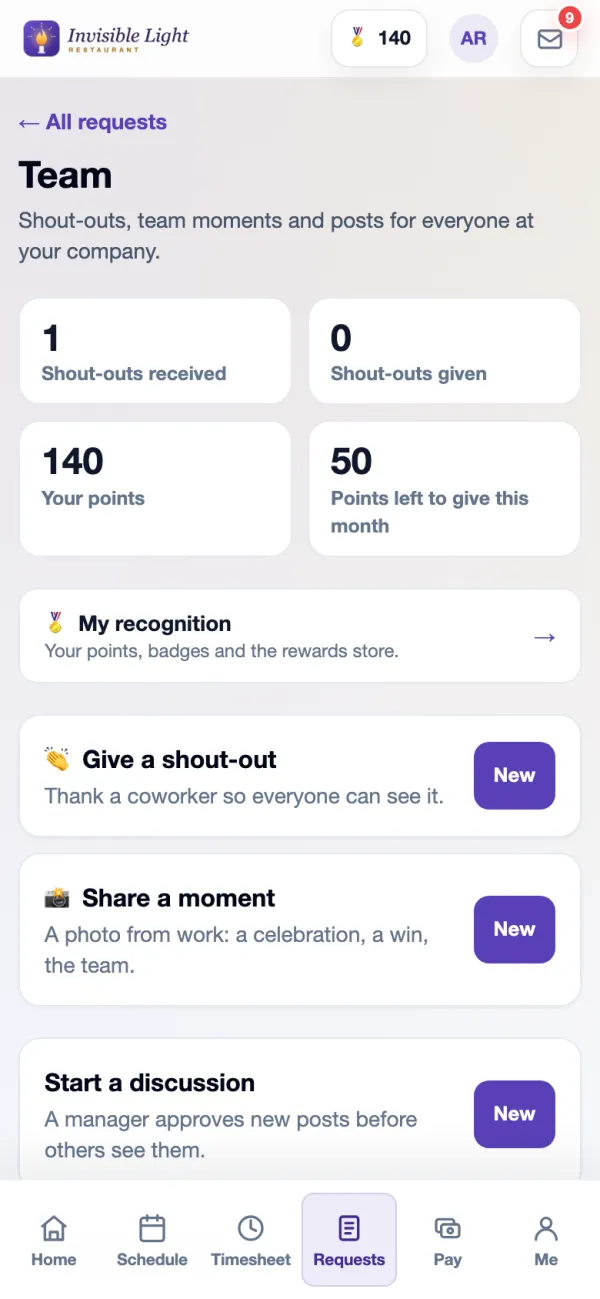
Every screen here is a real AppyShift page from our demo company, Invisible Light Restaurant. Open the demo to try it yourself.
Texts from AppyShift come from one number and name your company. People answer with a single word: a coworker claims an open shift, a manager approves it, an employee calls out with a reason. The same steps work in the app for everyone who doesn't use texts.
Choose whether open shifts are offered right away or a manager asks first, whether shift confirmations and new schedules ask for a reply, and which reminders go out. Quiet hours hold reminders that can wait until morning.
Post an update or a question for the whole company, pin what matters, and decide whether new posts wait for a manager. Employees can report a post, and you see the report next to it.
Employees open Team in the app to read posts, react, reply and start a discussion of their own. When a manager approves posts first, the app tells them so before they post.
Every feature, by plan
Included from the Growth plan up. Some features are for certain industries and are turned on in setup.
Enter your work email to begin your free-trial signup.
No. The app and email work without one. Texts go only to people who turn them on and confirm their number with a code, and anyone can reply STOP.
Employees reply CLAIM to an open-shift offer, OK to a new schedule or CONFIRM to a shift, and text SHIFTS, HOURS, BALANCE, OFF with a date, LATE or CALLOUT. Managers reply APPROVE or DENY to pickups, swaps and availability changes, and text TODAY or OPEN. Your company chooses which of these are on.
Not a free-form text. Alerts go out on their own, and a company admin can send a short urgent announcement by text to the employees who chose emergency alerts, up to twice a week. Everything else goes in the app and by email, where messages and announcements live.
Every plan includes texts each month: Basic 250, Growth 500 and Pro 750. Need more? Add 250 texts for $5. App notifications and email are unlimited.
No. The AppyShift app is on the App Store for iPhone, and AppyShift also works in any phone's web browser.
AppyConnect is included from the Growth plan up, with all of its features. Also on this page: app notifications and email, optional text alerts and reply by text, in every plan; and manager logbook, on the Pro plan.
The step-by-step guides from our help center, and the modules that work alongside this one.
Get texts about your schedule and work updates. Check the box, add your mobile number and save, then type the 6-digit code we text you into the box under your number.
Read the guide →Once text alerts are on, text a word like SHIFTS, HOURS, BALANCE or OFF to AppyShift and get an answer back. Text MENU to see which words you can use.
Read the guide →Employee scheduling built for shift-based teams: build and publish schedules, manage availability, and keep everyone informed about when they work.
See AppySchedule →Employee recognition and engagement that celebrates your people, encourages participation and strengthens your culture.
See AppyRecognize →Choose policy sections, tailor the starter language to your procedures, and assemble a printable handbook draft. Nothing is saved or uploaded.
Open the resource →The AppyShift modules
14 days free with every Pro feature. No credit card. Or open the demo first and click around.
Start free trial