For restaurants, retail, clinics and every hourly team

Callouts covered.
Hours approved.
Payroll ready.

One app for your hourly team, from first day to payday: hiring, onboarding, training, schedules, coverage, the time clock and pay stubs. Your team never has to leave it, and it reaches them in the app, by email or by text.

  • 14-day free trial
  • No credit card required
  • iPhone & Android apps
  • Call or text 833-660-0050
1 · Alex calls out
AppyShiftText Message
Tue 5:42 AM
CALLOUT fever, so sorry
Delivered
AppyShift: We told your manager at Invisible Light Restaurant you can't make Tue 9/29 6AM-2:30PM. You're still on the schedule until they change it, so check with them.
2 · Jordan claims it
AppyShiftText Message
Tue 5:44 AM
AppyShift (Invisible Light Restaurant): Open shift Tue 9/29 6AM-2:30PM Service Associate. Reply CLAIM or tap www.appyshift.com/r/… Reply STOP to opt out.
CLAIM
Delivered
AppyShift: Request sent. Your manager will approve it and you will get an update.
3 · Manager approves
AppyShiftText Message
Tue 5:46 AM
AppyShift (Invisible Light Restaurant): Approve Jordan L. to pick up Tue 9/29 6AM-2:30PM Service Associate? Reply APPROVE or DENY, or tap www.appyshift.com/r/… Reply STOP to opt out.
APPROVE
Delivered
AppyShift: Approved: Jordan L. to pick up Tue 9/29 6AM-2:30PM Service Associate. They will be told.

Covered before the doors open, without a single phone call.Example texts in AppyShift's real wording.
Texting is optional: the same steps work in the app.

Sound familiar?

Your week shouldn't run on a group chat.

Shift swaps buried in texts. Schedules split across versions. Paperwork followed up by hand. Here is the same week, run in AppyShift.

Coverage by group chat

The manager texts everyone, waits, and hopes someone answers before open.

Schedules split across versions

"Who changed Tuesday?" Every edit becomes another version to send around.

Paperwork chased by hand

New hires can't start until the forms come back, signed and complete.

One week in AppyShift

From Monday's schedule to a clean payday.

Every day of the hourly workweek, handled in one place. These are real AppyShift screens with a sample company.

Monday · 7:00 AM AppySchedule

Publish the schedule. Everyone knows by breakfast.

Build the schedule with availability, time off and labor cost in view. When you publish, every employee gets it in the app and by email, and by text if they turned texts on.

  • Availability, approved leave and conflicts shown as you build
  • Planned hours and overtime indicators before you publish
  • Optional AI Copy a schedule from a photo or spreadsheet
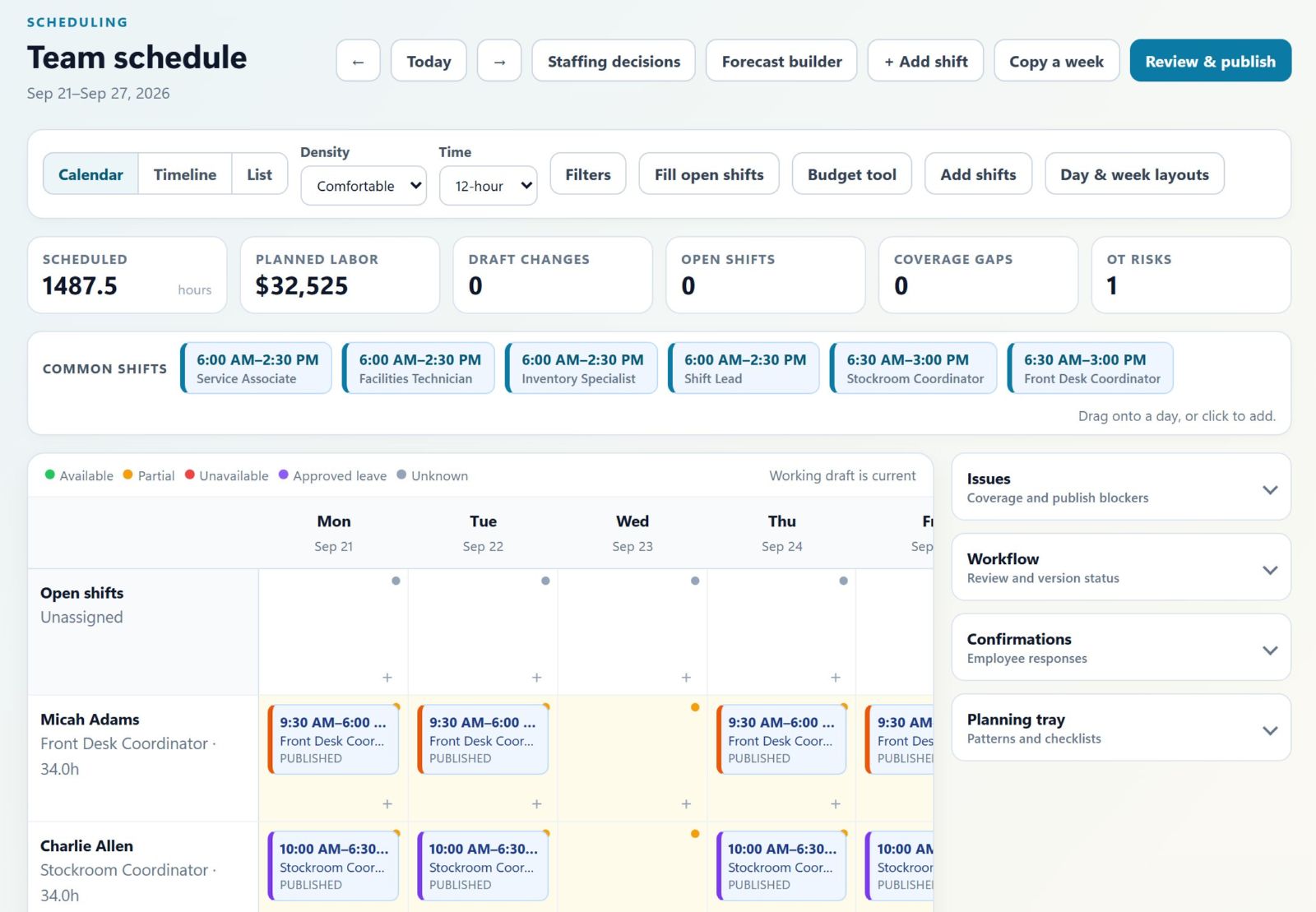
AppyShift team schedule with planned hours and overtime indicators
AppyShiftText Message
Mon 7:00 AM
AppyShift (Invisible Light Restaurant): Your schedule is posted for the week of Mon 9/28 (5 shifts). Reply OK once you've seen it, or tap www.appyshift.com/r/… Reply STOP to opt out.
OK
Delivered
AppyShift: Thanks! Your manager can see you've seen your schedule for the week of Mon 9/28 (5 shifts).
Tuesday · 9:00 AM

Check labor totals before the week gets away from you.

Compare scheduled and actual hours, labor cost and overtime by department. Workforce analytics puts the totals and pay-period forecast in one place, so you can spot a trend while there is still time to respond.

  • Review hours and labor cost by department
  • Check overtime and pay-period forecasts
  • Open the numbers behind each total
Tuesday · 2:45 PM AppyRecognize

Jordan saved the morning. Now the whole team knows.

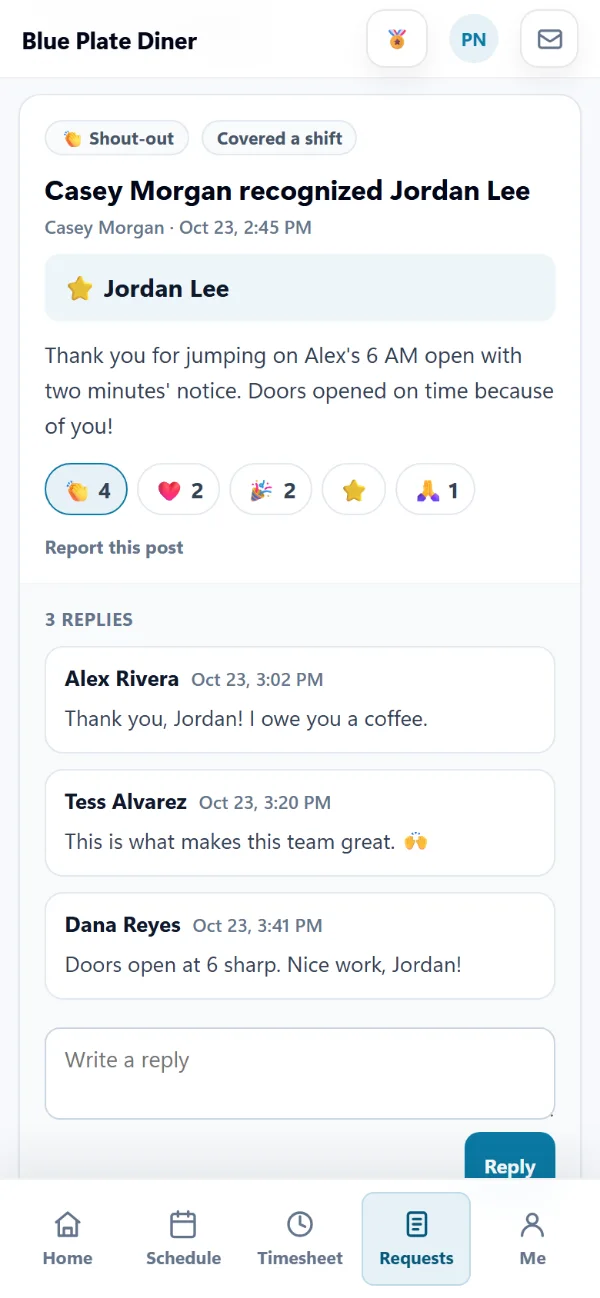
Remember Alex's 6 AM callout? When the shift ends, the manager thanks Jordan on the Team feed and everyone can cheer. Picking up a called-out shift also earns points and the Shift Saver badge on its own, so the people who step up get noticed without anyone keeping score.

  • Shout-outs, team photo moments, reactions, and automatic welcomes and work anniversaries
  • Points for picking up shifts, covering for coworkers and perfect attendance, with amounts you set
  • Badges, and a rewards store you stock yourself

Pro plan

A shout-out on the Team feed in the AppyShift app: the manager recognized Jordan Lee for covering a shift, thanking Jordan for jumping on Alex's 6 AM open with two minutes' notice, with reactions and replies from the team, including Alex (sample data)

The Team feed in the AppyShift app. Point amounts are set by each company.

Wednesday · 11:20 AM AppyRecruit

A great applicant books her own interview.

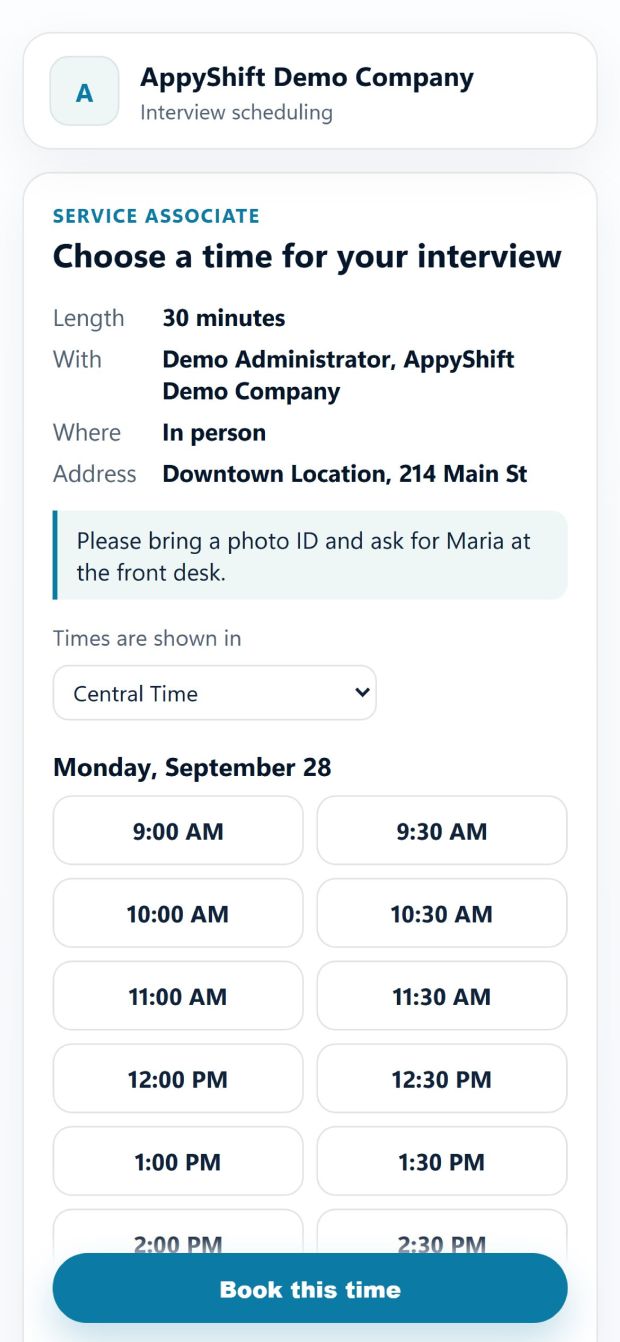
Send a private link by text or email. Priya picks a time that fits your calendar, and both of you get a calendar invite. She can move it from the same link.

  • Careers page, applicant tracking and two-way texting
  • Times from your interview hours and calendar, with reminders the day before
  • Optional AI Write job posts, or sum up an application and suggest interview questions. You decide who to hire.
Invisible Light RestaurantText Message
Wed 11:20 AM
Invisible Light Restaurant (via AppyShift): Hi Priya, please pick a time for your interview for Service Associate: appyshift.com/interview/… Reply STOP to opt out.
Booked from the link · 11:23 AM
Invisible Light Restaurant (via AppyShift): Hi Priya, your interview for Service Associate is confirmed for Mon, Sep 28 at 10:00 AM CDT. Details or changes: appyshift.com/interview/… Reply STOP to opt out.
Thank you! See you then 🙂
Delivered
Applicant page for choosing an interview time
The booked interview on the candidate page
Thursday AppyOnboard

Her first day starts before she walks in.

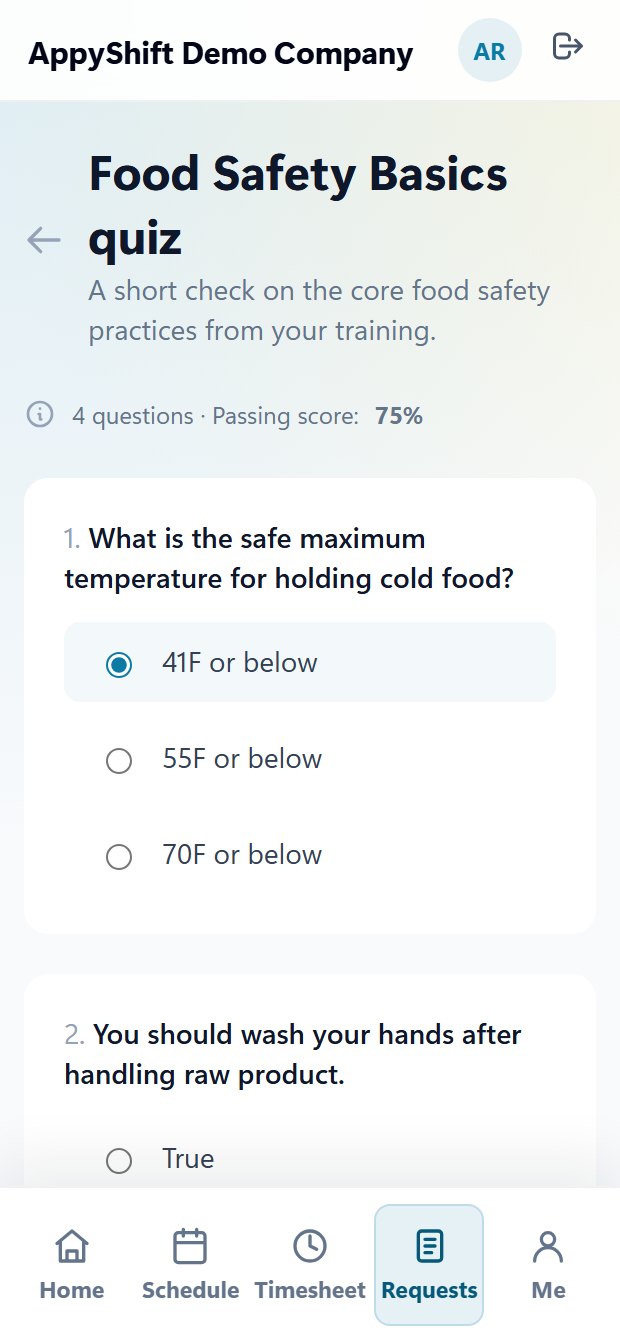
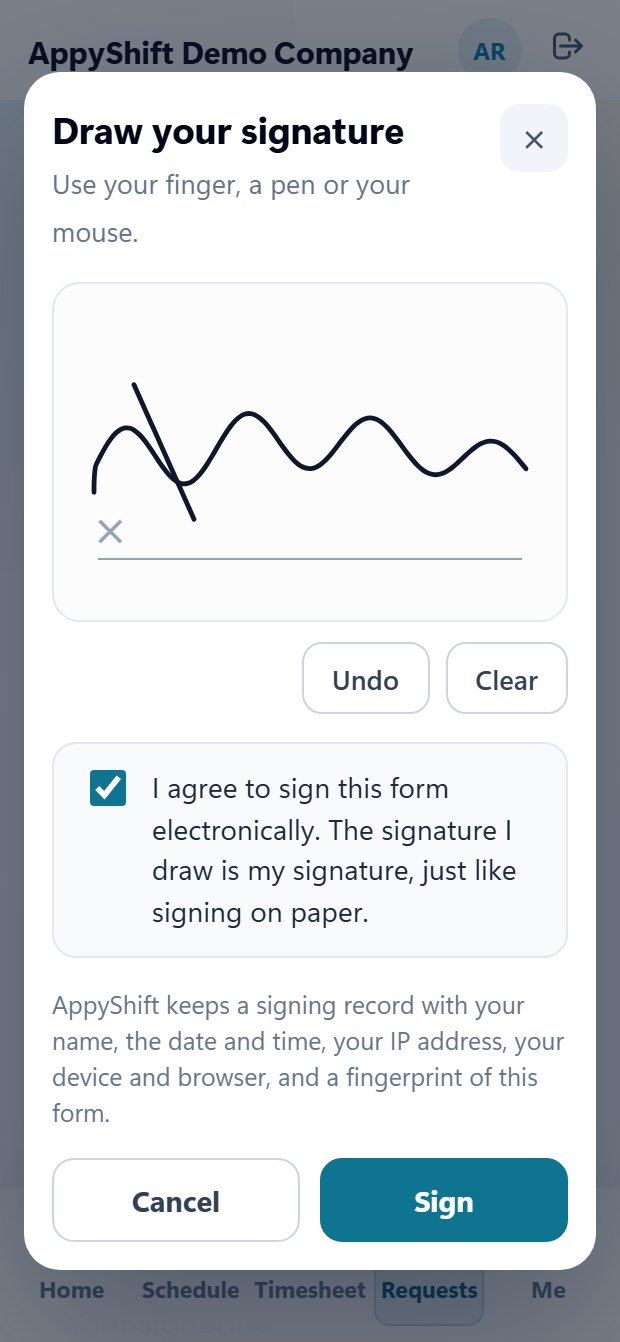
Build onboarding once for each position: turn any PDF into a form with fields and signatures, add a quiz with a passing score, training videos, and the I-9. Priya does it all on her phone and signs by drawing her signature. You see each step as it's done.

  • Custom forms from any PDF, signed by hand with a signing record: time, IP address and device
  • Quizzes with a passing score, and training videos with a minimum watch time
  • Document photos and the I-9 from her phone, in the order you set
A new hire taking a food safety quiz with a 75% passing score in the AppyShift app
A new hire drawing her signature and agreeing to sign electronically in the AppyShift app
Later Thursday AppyTraining

Keep your whole team sharp, two minutes at a time.

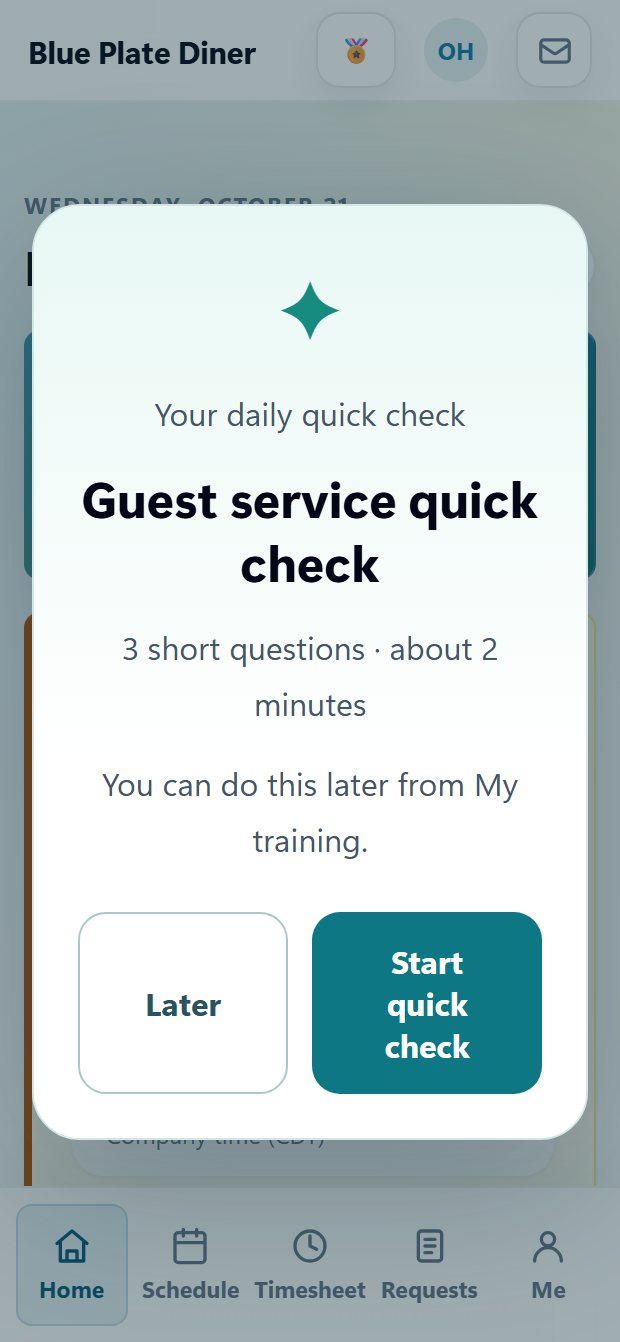
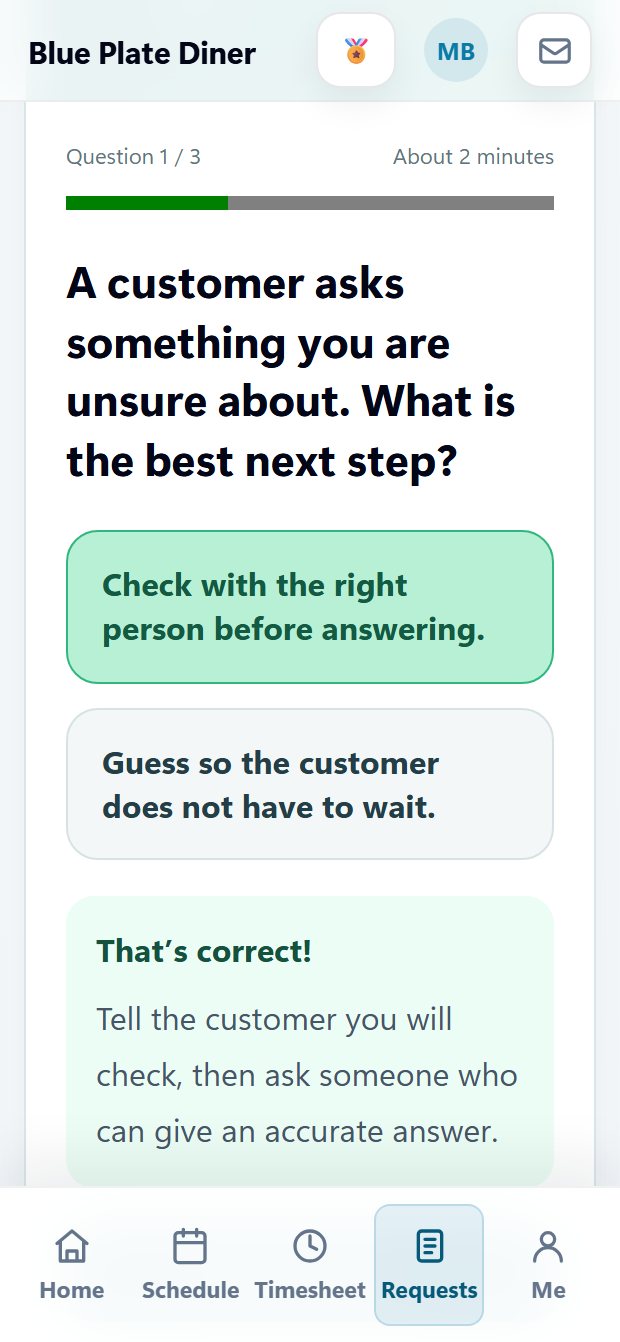
Assign a ready-made course or a quick quiz, and see who has finished. Reminders go out before training is due, and a certificate is saved when someone passes. Build your own interactive lessons too, and give your current team a two-minute quick check when they sign in, with instant feedback.

  • 24 ready-made courses, from respect at work and safety to using the app
  • Quick quizzes on their own or in onboarding, and records of training done elsewhere
  • Your own courses: flip cards, hotspots, matching and branching scenarios, plus daily quick checks that never get in the way of clocking in

Pro plan

See everything in AppyTraining

An employee signing in to the AppyShift app sees their daily guest service quick check: three short questions, about two minutes
A quick check question in the AppyShift app, answered correctly, with instant feedback that explains why
Friday AppyTime

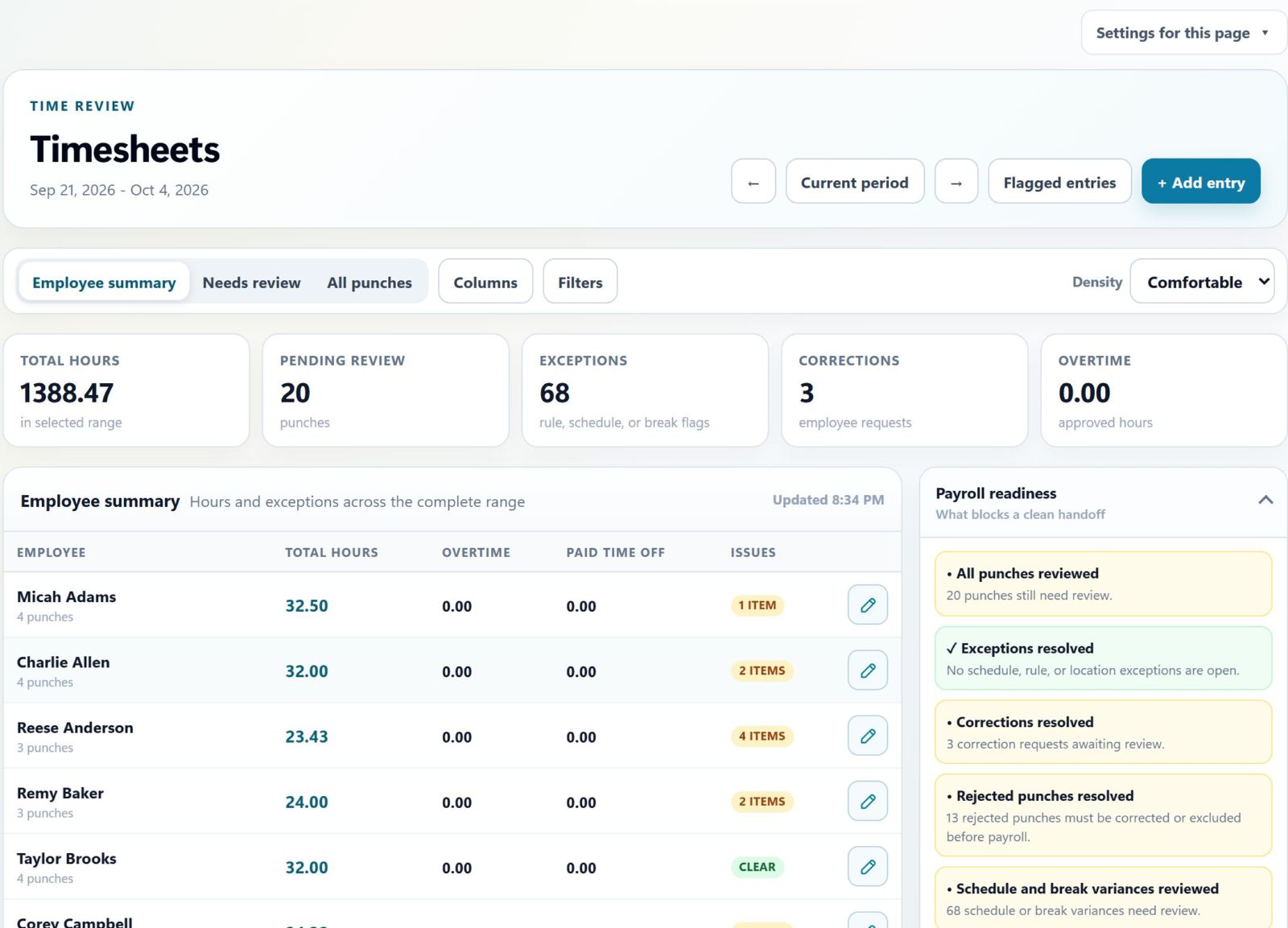
Get timesheets ready for payday.

Review hours, correct missed punches and resolve exceptions before payday. Friday is for preparing clean timesheets, so the final approval is ready when payday arrives.

  • Review clock-ins, breaks and schedule variances
  • Resolve missed punches and time corrections
  • Prepare clean timesheets for payday approval
Timesheet review with exceptions and payroll readiness
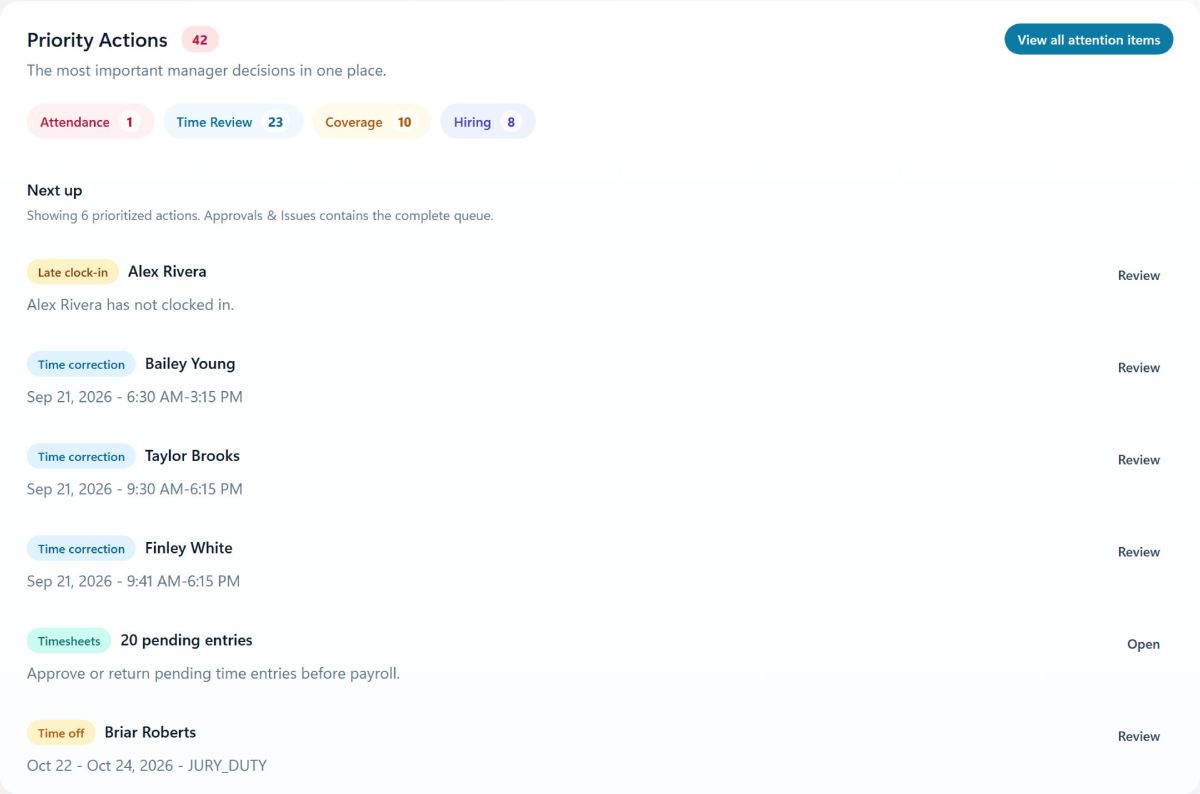
Priority actions on the AppyShift dashboard
Payday · the end of the week AppyPayroll

Approve time. It becomes pay.

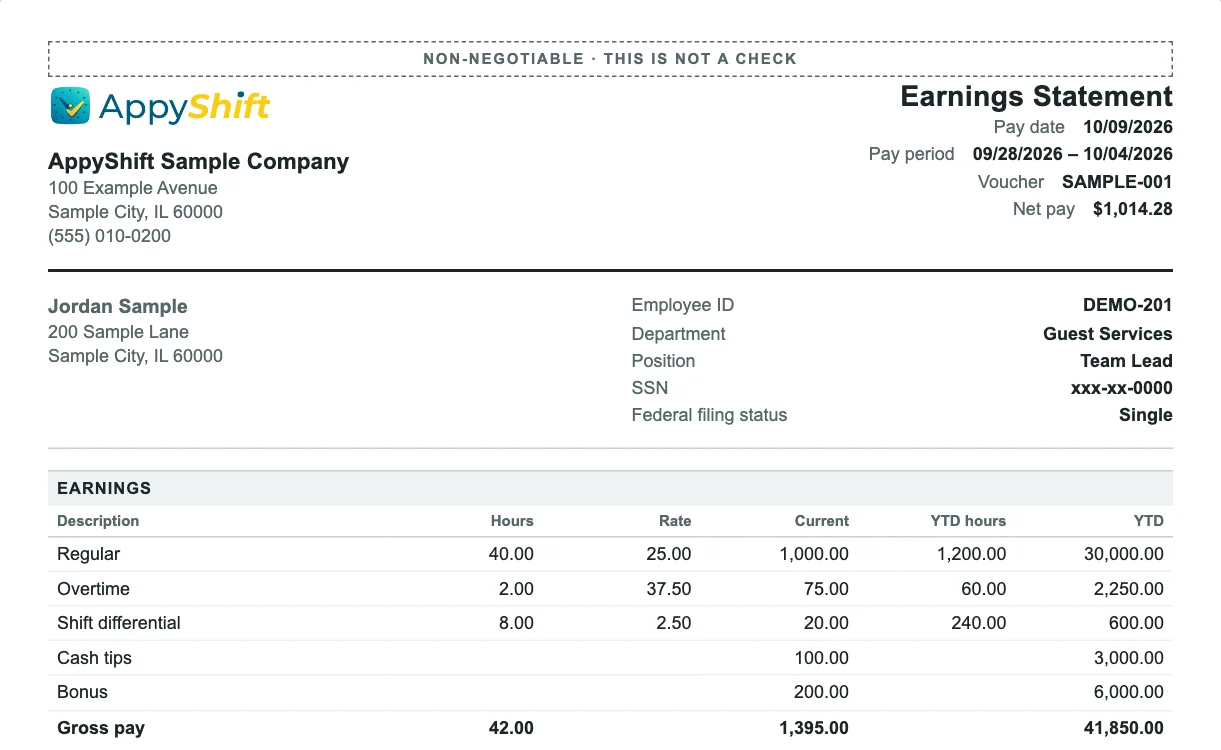
On payday, review and approve the completed timesheets. AppyPayroll carries those approved hours into payroll, with overtime, differentials and tips already worked out, so nobody has to retype a timesheet.

  • Less time: no re-entering hours, rates or tips into another system
  • Fewer mistakes: missed punches and open corrections are caught before payday, not after
  • With AppyPayroll, pay stubs and W-2s open in the app, next to each person's schedule

Run payroll with AppyPayroll for $40 a month, plus $4 for each person you pay that month. We file and pay your federal and state payroll taxes, and your team is paid by direct deposit or check. Now onboarding a select group of businesses. See AppyPayroll

Or keep your provider: AppyTime exports approved hours for ADP, Gusto, UKG, Paychex, Paycom, Paylocity or a spreadsheet.

A sample earnings statement built from the approved hours: 40 regular hours, 2 overtime, a shift differential, tips and a bonus, $1,014.28 net pay
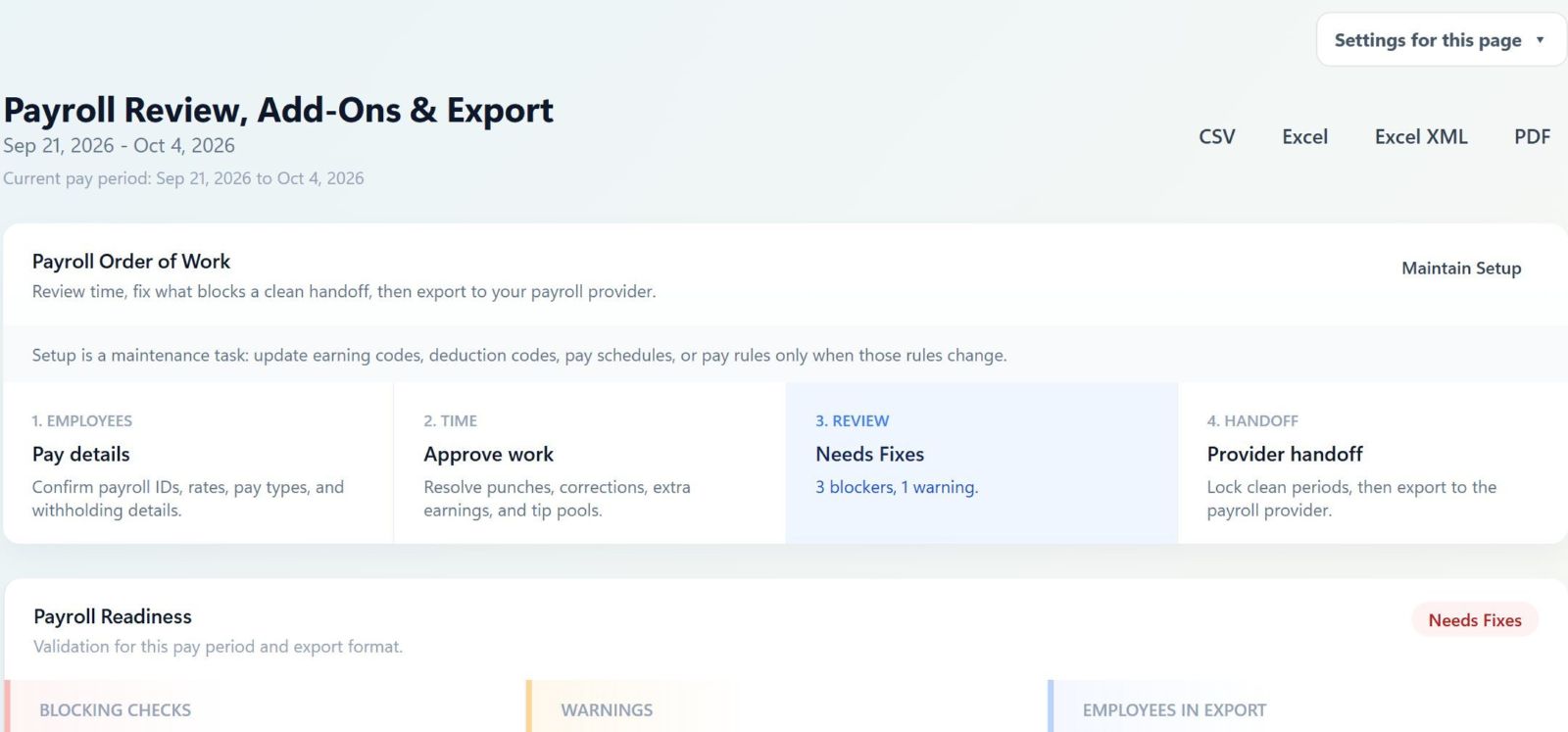
Payroll review in AppyShift: pay details, approved time, what needs a fix, and the handoff, in order

Texting is optional AppyConnect

App, email or text. Your team's choice.

Every alert lands in the AppyShift app with a push notification, free and unlimited. Schedules, time off, swaps, onboarding, pay stubs and announcements go by email too. Texting is there for the people who want it.

Always on · Unlimited

In the app

A push notification, plus an inbox in the app. Every alert lands here, and people act on it with a tap.

Unlimited

By email

Schedules, time off, swaps, onboarding, pay stubs and announcements. No phone number needed.

Mon 7:00 AM
AppyShift (Invisible Light Restaurant): Your schedule is posted for the week of Mon 9/28 (5 shifts). Reply OK once you've seen it, or tap www.appyshift.com/r/… Reply STOP to opt out.
OK
Delivered
AppyShift: Thanks! Your manager can see you've seen your schedule for the week of Mon 9/28 (5 shifts).
Optional

By text

Only for people who turn it on and confirm their number. Handy for one-word replies like OK and CLAIM.

  • No one has to share a phone number
  • Each person picks how they hear from you
  • You choose which alerts can go by text

From first day to payday

One app instead of six.

Your team applies, signs their paperwork, sees their schedule, clocks in and gets paid in the same app, and never has to go anywhere else. AppySchedule and AppyTime start at $30 a month for up to 30 employees, AppyRecruit comes with Growth, and AppyPayroll adds payroll to any plan.

  1. Apply
  2. Onboarding paperwork
  3. Finish training
  4. See the schedule
  5. Clock in
  6. Swap or pick up shifts
  7. Get thanked by the team
  8. Pay stubs and W-2
Scheduling appTime clockGroup chatPaper packetsJob boardPayroll & pay stubs → AppyShift

See it before you choose

See it with your own week.

Live demo, no signup

Step into a company with 50+ employees, real schedules and requests. Change anything. It resets every few minutes. Open the demo →

14 days free, no card

Try every feature with your own team. Month-to-month self-serve plans after that, or save 15% yearly.

We'll move your data

Send us your export and we'll bring over employees, schedules and time-off balances. Free with yearly plans.

An app your team will use

Schedules, clock-in, requests, documents and, with payroll, pay stubs and W-2s, all in the AppyShift app for iPhone and Android, or in any phone's browser.

Download on the App Store Get it on Google Play

Real people to help

Call or text 833-660-0050, or email support. We set things up with you.

Built to protect your people

Two-step sign-in, encrypted SSNs, and texts only to people who opted in.

Customer stories

What managers say about AppyShift

Approved feedback from customers using AppyShift in their day-to-day operations.

Restaurant
“We were running three separate apps and a spreadsheet. AppyShift is a true all-in-one app that's genuinely affordable — it saves us money every month.”
James D. Restaurant Owner
Retail
“It's incredibly powerful yet completely customizable. We tailored roles, tasks, and time-off rules to fit exactly how we work, and it saves me hours every pay period.”
Kim H. HR Manager
Hospitality
“My team picked it up on day one — it's that user-friendly. Having scheduling, coverage, and payroll-ready time in one place saves us so much time.”
Joseph P. General Manager

Customer names are abbreviated for privacy.

Pricing

Simple, transparent pricing

Start free, keep the setup light, and scale the platform around the size of your team.

Basic
$30/mo

Billed monthly.

Everything you need to schedule your team and track their time.

  • 30 employees included
  • 250 texts and 25 AI credits a month
  • Human response within 48 hours
Pro
$90/mo

Billed monthly.

For operators who build their culture, train their team and want deeper reporting.

  • 200 employees included
  • 750 texts and 250 AI credits a month
Everything in Growth, plus
  • Custom reports
  • Scheduled report emails
  • Integrations and API access
  • Audit log
  • The Operations hub
  • Launch support for larger teams
Enterprise
Custom

Custom annual or monthly contract options.

For larger teams that need custom workflows, integrations, and hands-on rollout support.

  • Unlimited employees
  • Texts and AI credits set by your contract
Everything in Pro, plus
  • Custom branding and domain
  • Advanced payroll export support
  • Integration support
  • Dedicated onboarding
  • Priority account support

Add-ons

For any plan.

  • 50 more employees $20 a month Add as many packs as you need.
  • 250 more texts $5 Prepaid, any time. Texting is optional: every alert also goes out in the app.
  • 250 more AI credits $5 Prepaid, for the optional AI helpers.
  • AppyPayroll, by approval $40 a month plus $4 for each person paid that month Federal and state tax filing and deposits included. Works with any plan; we approve each business before it starts. Request access

Modules in each plan

Each plan includes whole AppyShift modules, and each plan has everything in the one before it. Add AppyPayroll to any plan to run payroll in the same app.

The AppyShift modules in each plan
Module Basic Growth Pro Enterprise
AppyRecruit Not included Included Included Included
AppyOnboard Not included Included Included Included
AppyTraining Not included Not included Included Included
AppySchedule Included Included Included Included
AppyTime Included Included Included Included
AppyConnect Not included Included Included Included
AppyRecognize Not included Not included Included Included
Custom reports, integrations and Operations Not included Not included Included Included
AppyPayroll Add-on for any plan, by approval

Enterprise has every module.

Need Enterprise onboarding, custom branding, integration support, or non-profit pricing? Talk with our team or email support@appyshift.com.

Compare all 90 features by plan
Every AppyShift feature by module, and the plans that include it
Feature Basic Growth Pro
Plan basics
Employees includedAdd 50 more for $20 a month. More than one pack is fine. 30 included 100 included 200 included
Texts included each monthOptional. More in prepaid packs. 250 500 750
AppyRecruit
Job openings and careers pageRequisitions, job posts, and your own careers page. Not included Included Included
Applicant trackingEvery applicant in one pipeline, with notes and email. Not included Included Included
Applicant textingText applicants who agreed to texts, with every message kept. Not included Included Included
Interview schedulingApplicants pick an interview time from your team's open slots. Not included Included Included
Job board feedGoogle for Jobs details on every job page, and a job feed you can give Indeed and other job boards. Not included Included Included
Hire to onboardingTurn a hire into an employee with an onboarding template and app access. Not included Included Included
AppyOnboard
Onboarding tasks and formsNew-hire to-dos, forms, quizzes, and policy sign-offs. Not included Included Included
Form I-9Complete Form I-9 online, with Social Security numbers encrypted. Not included Included Included
CertificationsTrack certifications and licenses and when they expire. Not included Included Included
AppyTraining
Ready-made training courses24 courses on workplace topics and on using the app, for employees and managers, to adapt and assign. Not included Not included Included
Quick quizzesA few questions with a passing score, assigned on their own or as an onboarding step. Not included Not included Included
Assign and track trainingAssign by person, department, position or location, with due dates, renewals and reminders in the app. Not included Not included Included
Training records and certificatesA training matrix, each person's record, completion certificates, and training done elsewhere imported from Excel or CSV. Not included Not included Included
Training in the employee appEmployees see what's due, take each lesson on their phone and say whether it helped. Not included Not included Included
Custom course builderYour own lessons: video, PDFs to fill and sign, flip cards, hotspots, matching, sorting, branching scenarios and more. Not included Not included Included
AI course draftingOptional: draft lessons and a quiz from your notes, make a lesson interactive, or make a Spanish copy, with AI credits. Not included Not included Included
Two-minute quick checksShort checks with instant feedback, offered once a day when employees sign in. Not included Not included Included
Learning paths and automatic assignmentsCourses in order, and rules that give them to new hires and groups on their own. Not included Not included Included
Learning missions and achievementsLessons played as levels, plus learning points, badges, streaks, team challenges and an optional leaderboard. Never money. Not included Not included Included
Practical sign-offs and course reviewA manager signs off a task they watched, and coworkers comment on a course before it goes out. Not included Not included Included
Training webhooks and chat alertsSend assignments, completions and certifications to other systems, and overdue training to Teams or Slack. Not included Not included Included
AppySchedule
Schedule builderBuild and publish the week with shift templates and an auto-built first draft. Included Included Included
AvailabilityEmployees set when they can work, and managers see it while scheduling. Included Included Included
Open shifts and shift swapsEmployees pick up open shifts and trade shifts, with manager approval. Included Included Included
Callout coverageEmployees call out in the app, and the shift is offered to people who can cover it. Included Included Included
Break planningPlan paid and unpaid breaks with suggested times that keep the floor covered. Included Included Included
Schedule change alertsEmployees are told when their shifts move or change. Included Included Included
Labor budgetCompare scheduled labor with sales and your labor budget. Included Included Included
Departments, positions, and locationsSchedule and report by team, role, and site. Included Included Included
Home care visitsClients, visits on the schedule, caregiver check-in at the home, travel, and mileage. Included Included Included
Visit watchLate and missed visits flagged as they happen, with a fast way to send a replacement. Included Included Included
Authorizations and visit recordsTrack authorized hours for each client and keep visit check-in records. Included Included Included
Census-based staffingStaff each unit from its resident count, with PBJ staffing reports and the quarterly PBJ file for CMS. Included Included Included
AppyTime
Clock in on a phone or computerClock in and out, and start and end breaks, from the app or a browser. Included Included Included
Shared kioskA shared tablet where employees clock in with a PIN or a badge QR code. Included Included Included
On-site clock-in rulesAllow phone clock-ins only at the location, or only on your network. Included Included Included
Timesheets and approvalsReview, correct, and approve hours. Employees can ask for corrections. Included Included Included
Attendance trackingLate, early, and missed punches and call-outs, flagged for review. Included Included Included
Custom overtime, break, and pay rulesSet your own overtime, break, and shift differential rules, with different rules for a location, department, state or group (8/80 for healthcare too), and test them on a sample week. Included Included Included
Time-off requests and approvalsEmployees ask for time off in the app, and managers approve it. Included Included Included
PTO policies and accrualsAccrual rules and balances that employees can check themselves. Included Included Included
Minimum wage checkEvery hourly rate compared with the minimum wage where the person works. Included Included Included
Payroll review and exportsCheck pay, then export for ADP, Gusto, Paychex, Paycom, Paylocity, UKG, or a general file. Included Included Included
Expense reimbursementsEmployees send expenses with receipt photos and mileage. Managers approve them, and approved expenses are added to the payroll export. Included Included Included
Tip poolingPool and share tips, ready for payroll. Included Included Included
AppyConnect
Workplace messagingDirect and group messages between managers and employees. Not included Included Included
AnnouncementsPost to everyone or one department, and send by push and email. Not included Included Included
Discussion boardA company-wide board where everyone can post and reply. Not included Included Included
SurveysBuild employee surveys and see the answers. Not included Included Included
Documents and policiesPublish handbooks, policies, and HR documents. Not included Included Included
AppyRecognize
Culture & RecognitionShout-outs between coworkers, team photo moments, reactions, and automatic welcomes and work anniversaries on the board. Not included Not included Included
Points, badges and rewardsPoints for picking up shifts, covering for coworkers and perfect attendance, badges, and a rewards store you stock yourself. Not included Not included Included
Engagement insightsHow many people take part in recognition, by department and location, never by person. Not included Not included Included
Custom reports, integrations and Operations (Pro)
Custom and scheduled reportsBuild your own reports and have them emailed on a schedule. Not included Not included Included
Audit logSee who changed what, and when. Not included Not included Included
Integrations and APIConnect other systems and use the AppyShift API. Not included Not included Included
Operations workspaceRun each shift from one Today board: what needs attention, assignments, checklists, handoffs, and follow-up. Not included Not included Included
Scheduled checklistsOpening, closing, and safety checklists that come due on their own, with sign-off. Not included Not included Included
My work for employeesEmployees see their jobs, checklists, and assignments for the shift on their phone. Not included Not included Included
Sites and routesCustomer sites, repeat jobs, and each crew's route for the day. Not included Not included Included
Equipment trackingEquipment checkout, service dates, and checks before use. Not included Not included Included
Security guard toursNFC checkpoints, post orders, missed-checkpoint alerts, and a daily activity report. Not included Not included Included
Lost and foundLog found items and who picked them up. Not included Not included Included
Housekeeping room boardRoom status, attendants, and inspections for hotels. Not included Not included Included
Child care ratiosChild-to-staff ratios for each room, from head counts, and staff training hours. Not included Not included Included
Pesticide application recordsTreatment records kept on the job where the work was done. Not included Not included Included
Warehouse productivityUnits per hour against your standards, with incentive pay drafts. Not included Not included Included
Cleaning inspectionsScore client sites. A failed inspection sends a re-clean job. Not included Not included Included
Field service job reportsParts used on each job, travel time, mileage, and a job report. Not included Not included Included
Cash counts and tip declarationsDrawer counts with over and short, and cash tips declared at clock-out. Not included Not included Included
Injury and illness logRecord workplace injuries and illnesses with the employee's records, visible only to the people you choose. Not included Not included Included
Staffing measuresTrack forecasts, results, and service volume against staffing. Not included Not included Included
Work orders and jobsTrack jobs, batches, routes, or events on the shift board. Not included Not included Included
Certification-gated assignmentsA warning when someone is assigned without a required certification. Not included Not included Included
Variable payPiece rate, commission, service charges, bonuses, and more. Not included Not included Included
Client or site sign-offA client or site contact signs off after a shift or job. Not included Not included Included
Photo proofBefore-and-after, completion, and damage photos. Not included Not included Included
Manager logbookShift notes and manager-to-manager follow-up. Not included Not included Included
Incident logTrack issues and exceptions by severity until they're resolved. Not included Not included Included
Across every module
Employee profilesContact details, pay rates, and your own custom fields. Included Included Included
Spreadsheet importBring in your whole team from a spreadsheet. Included Included Included
Employee self-serviceEmployees see their schedule, hours, time off, and to-dos in the app or a browser. Included Included Included
Employee documents and notesKeep each employee's files and manager notes in one place. Included Included Included
App notifications and emailUnlimited, on every plan. Included Included Included
Optional text alertsEach plan includes texts every month. More come in prepaid packs. Included Included Included
Reply by textWith text alerts on, employees reply CLAIM or OK and text CALLOUT, LATE, SHIFTS or OFF. Managers reply APPROVE or DENY. Included Included Included
ReportsReady-made reports on your team and labor, which you can export. Included Included Included
Roles and permissionsAdmins and managers see only what they need. Included Included Included
Two-step sign-in and passkeysSign in with Face ID, a fingerprint, or a code. Included Included Included
Encrypted sensitive dataSocial Security numbers are encrypted, and pay details are limited to the people who need them. Included Included Included

Enterprise includes everything in Pro, plus: custom branding and domain, advanced payroll export support, integration support, dedicated onboarding, priority account support.

Start with the free trial

14 days free with every Pro feature. No credit card. Then choose the plan that fits.

Open full signup
No credit card required Complete account setup next
Free with annual plans

We'll move your data for you.

Switching from another system? Send us your export and our team will move your employees, schedules, and time-off balances into AppyShift for you.

Free when you sign up for a year of service. On a monthly plan? Reach out and we'll quote it for you.

Annual plans also include free importing of all active employees and everyone paid this calendar year. Current-year pay history comes over too when you join AppyPayroll, which is billed separately.

Prefer to do it yourself? Upload a spreadsheet of your team in a couple of minutes.

What we move

  • Employee profiles, contact details, and job titles
  • Departments, positions, and work locations
  • Pay rates and payroll IDs
  • Time-off balances and upcoming schedules

Where it can come from

  • Spreadsheets (Excel or CSV)
  • Payroll provider exports
  • Another scheduling or time-clock app
  • Other HR systems
Common questions

Know what happens before you start

Practical answers for managers considering AppyShift for their team.

How do employees access AppyShift?

Employees use their self-service portal to view assigned shifts and use enabled tools such as call-outs, availability requests, time off, or time-clock actions.

Can managers approve shift pickup requests?

Yes. Managers can require review for qualified pickup requests or choose an available automatic approval policy in the coverage settings.

Can we organize multiple roles or locations?

Yes. AppyShift supports positions and work locations used for schedules, employee assignments, and configured qualification checks.

Which plan includes recruiting?

Recruiting, our AppyRecruit module, is included in Growth and higher plans. It covers requisitions, applicants, stage tracking, hiring notes, resume collection, and public careers pages.

Which plan includes training?

AppyTraining is included in the Pro plan, whole: 24 ready-made courses, quick quizzes, reminders, certificates and records of past training, plus your own interactive courses, two-minute quick checks, learning paths, automatic assignments and learning achievements.

Can AppyShift run payroll?

Yes. AppyPayroll runs payroll from the hours you already approve in AppyShift and files and pays your federal and state payroll taxes from your own bank account, with direct deposit or checks, and pay stubs and W-2s in the app. It's an add-on for $40.00 a month, plus $4.00 for each person you pay that month, with tax filing included, now onboarding a select group of businesses: apply to join. Happy with your provider? AppyTime exports approved hours to ADP, Gusto, UKG, Paychex and others.

Can you move our employees from our current system?

Yes. Upload a spreadsheet of your team yourself, or ask about our data import service and our team will move your employees, schedules, and time-off balances for you. The import is free when you sign up for a year of service. Annual plans also include free importing of all active employees and everyone paid this calendar year. Current-year pay history comes over too when you join AppyPayroll, which is billed separately.

Does AppyShift use AI?

Only if you want it. AI is off until your company turns it on in Settings. Then it can copy a schedule from a photo or spreadsheet, ask for schedule changes in plain words, write job posts, sum up an application and suggest interview questions, help write messages to your team, draft announcements, put messages in Spanish and sum up survey answers. It only writes drafts: a person checks everything before it's saved or sent, and text that looks like an SSN, card or bank number is never sent. Every plan includes AI credits each month (25 on Basic, 100 on Growth, 250 on Pro), and each AI button shows its credits before you click.

What happens after I enter my work email?

AppyShift takes you to the full signup page with your email already filled in, so you can start your free trial.

See the workflow for yourself

Ready to see AppyShift with your team?

Start a free workspace or explore the live demo with realistic schedules, requests, timesheets, payroll review, recruiting, and employee self-service.

14 days free · Every Pro feature · No credit card